Reduce App Size with Dynamic Feature Modules
Building an Android app that downloads its own screens on demand, and hand-wiring Dagger across a boundary Hilt can't see.
Every Android tutorial teaches you the same shape of app: one module, one Hilt graph, done. Annotate Application with @HiltAndroidApp, annotate your Activity with @AndroidEntryPoint, and an automated electrician wires your whole dependency graph together at compile time. It works beautifully, right up until you try to ship a screen that most users will never open, and you'd rather not make everyone download it anyway.
That's the problem CrikStats exists to poke at. It's a small cricket stats app with exactly one interesting property: the player stats screen isn't in the initial install. It's a Play Feature Delivery module, downloaded on demand, and getting Dagger to work across that boundary turned out to be a far more specific problem than "add Hilt and move on."
The Shape of It
It comes down to two Gradle modules: a base app and an on-demand featureplayer, where the feature module reuses the base app's Retrofit instance without Hilt ever knowing the feature module exists, plus a local testing setup that actually exercises the on-demand download instead of quietly cheating past it.
Tech Stack: Kotlin, Jetpack Compose, Hilt + Dagger, Play Feature Delivery, Retrofit, Bundletool.
The Traditional Approach: The Monolith
Traditionally, when you build an Android app, everything goes into one bucket. One app module. Every Activity, every repository, every network client lives together. When a user taps Install, they download the entire codebase. If your app has fifty features, they get all fifty, even if they only ever touch two.
In that world, Hilt is trivial. Because the app module can see every file in the project at compile time, it draws one massive dependency graph and wires everything automatically. The network client gets created once; any Activity that asks for it gets it, no manual plumbing required.
The Dynamic Shift: Reversing the Dependency
CrikStats throws that out. It's split into two physical modules: app (the base) and featureplayer (a dynamic feature module).
app is the host. It owns the singleton NetworkModule, the shared UiState, and the download trigger on the home screen. featureplayer owns the actual player stats screen and its repository, and it's declared as on-demand right in its manifest:
<dist:module
    dist:instant="false"
    dist:title="@string/title_feature_player">
    <dist:delivery>
        <dist:on-demand />
    </dist:delivery>
    <dist:fusing dist:include="true" />
</dist:module>
That one block tells the Play Store: don't put this in the base install. Great for the user's storage. Less great for us, because it reverses the dependency arrow. featureplayer depends on app at the Gradle level:
// featureplayer/build.gradle.kts
plugins {
    id("com.android.dynamic-feature")
    id("org.jetbrains.kotlin.android")
}

dependencies {
    implementation(project(":app"))
}
But app is compiled with zero knowledge that featureplayer exists. It can't be any other way: the base APK has to build and ship even if the feature module is never downloaded.
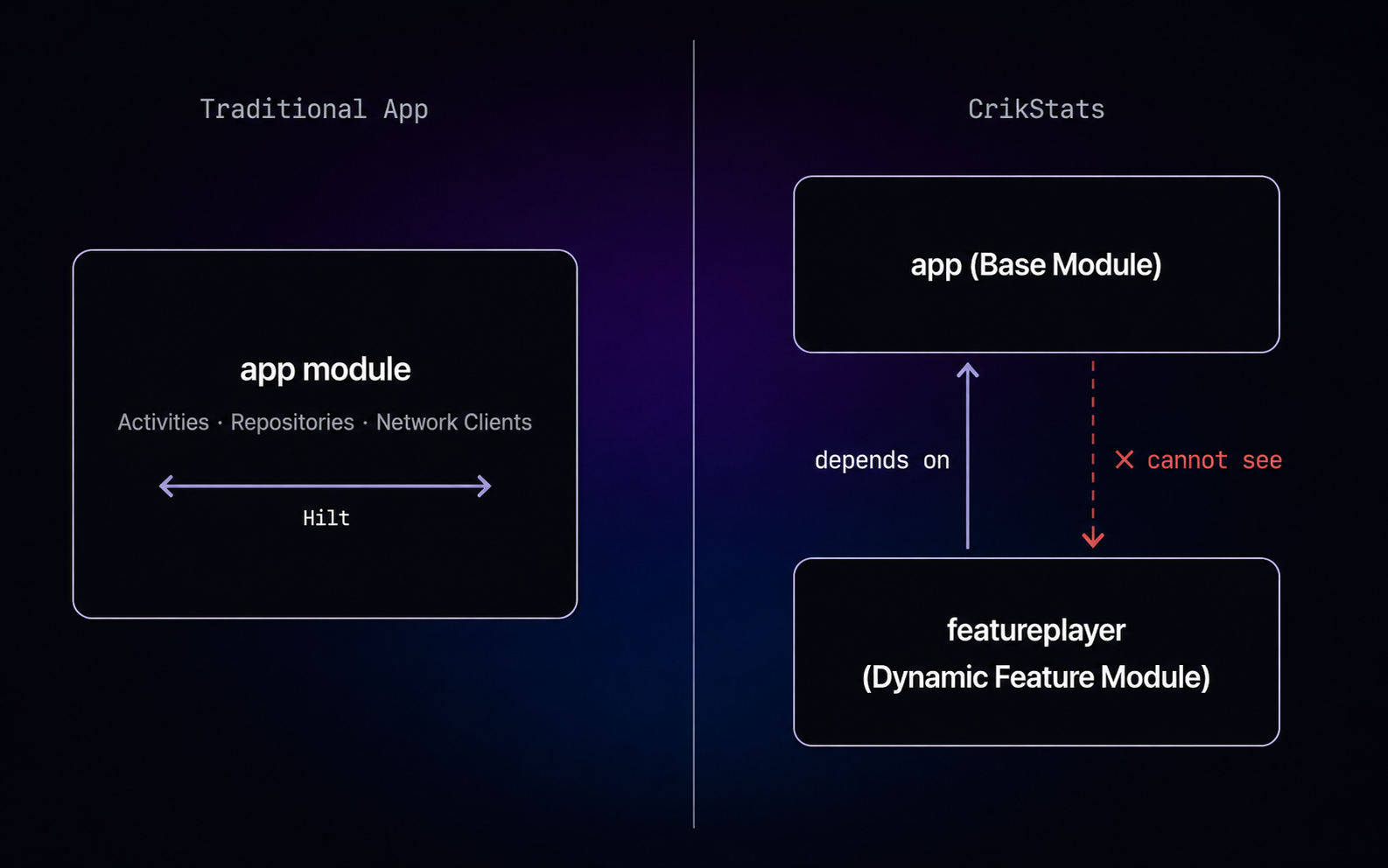
Figure 1. The dependency arrow reverses once the feature module becomes on-demand.
The Dependency Injection Challenge
This reversed visibility breaks Hilt outright. Slap @AndroidEntryPoint on PlayerStatsActivity and the build fails. Hilt's generated components live in app, and it has no idea PlayerStatsActivity is even a class that exists, let alone one that needs injecting.
The lazier fix, spinning up a second Retrofit instance inside featureplayer, was never really an option either. That would mean a second OkHttpClient, a second connection pool, duplicate memory and battery cost, for a network client the base app was already maintaining a few classloaders away.
The Solution: Component Dependencies
The fix is a manual bridge between Hilt's automated graph in app and plain Dagger in featureplayer, built in three pieces.
1. The contract, in the base module. PlayerModuleDependencies is an @EntryPoint-annotated interface: a labeled outlet on the outside of the base app's wall, advertising exactly one thing it's willing to hand out:
// app/.../di/PlayerModuleDependencies.kt
@EntryPoint
@InstallIn(SingletonComponent::class)
interface PlayerModuleDependencies {
    fun provideRetrofit(): Retrofit
}
That Retrofit is the same singleton instance Hilt's own NetworkModule builds for the rest of the base app. Nothing feature-specific about it.
2. The manual component, in the feature module. Since Hilt's code generation can't reach across the boundary, featureplayer falls back to core Dagger 2. It declares its own @Component, and instead of depending on anything Hilt-generated, it depends directly on the interface from step one:
// featureplayer/.../di/PlayerComponent.kt
@Component(
    dependencies = [PlayerModuleDependencies::class],
    modules = [PlayerInternalModule::class]
)
interface PlayerComponent {
    fun inject(activity: PlayerStatsActivity)

    @Component.Builder
    interface Builder {
        fun context(@BindsInstance context: Context): Builder
        fun appDependencies(dependencies: PlayerModuleDependencies): Builder
        fun build(): PlayerComponent
    }
}
PlayerInternalModule only has to build what's local to the feature, turning that shared Retrofit into a PlayerApiService:
@Module
object PlayerInternalModule {
    @Provides
    fun providePlayerApiService(retrofit: Retrofit): PlayerApiService {
        return retrofit.create(PlayerApiService::class.java)
    }
}
3. The runtime hand-off, at onCreate. This is where it all clicks together. There's no @AndroidEntryPoint here. Injection happens manually, before super.onCreate():
// featureplayer/.../PlayerStatsActivity.kt
private fun injectDependencies() {
    DaggerPlayerComponent.builder()
        .context(this)
        .appDependencies(
            EntryPointAccessors.fromApplication(
                applicationContext,
                PlayerModuleDependencies::class.java
            )
        )
        .build()
        .inject(this)
}
EntryPointAccessors.fromApplication reaches into the base app's Application context, pulls out the real implementation of PlayerModuleDependencies that Hilt generated for it, and hands it to the feature module's builder. The isolated feature reaches back across the module boundary and grabs the exact same Retrofit singleton: no duplicate client, no leaked connections, and app never had to know featureplayer existed to make it possible.
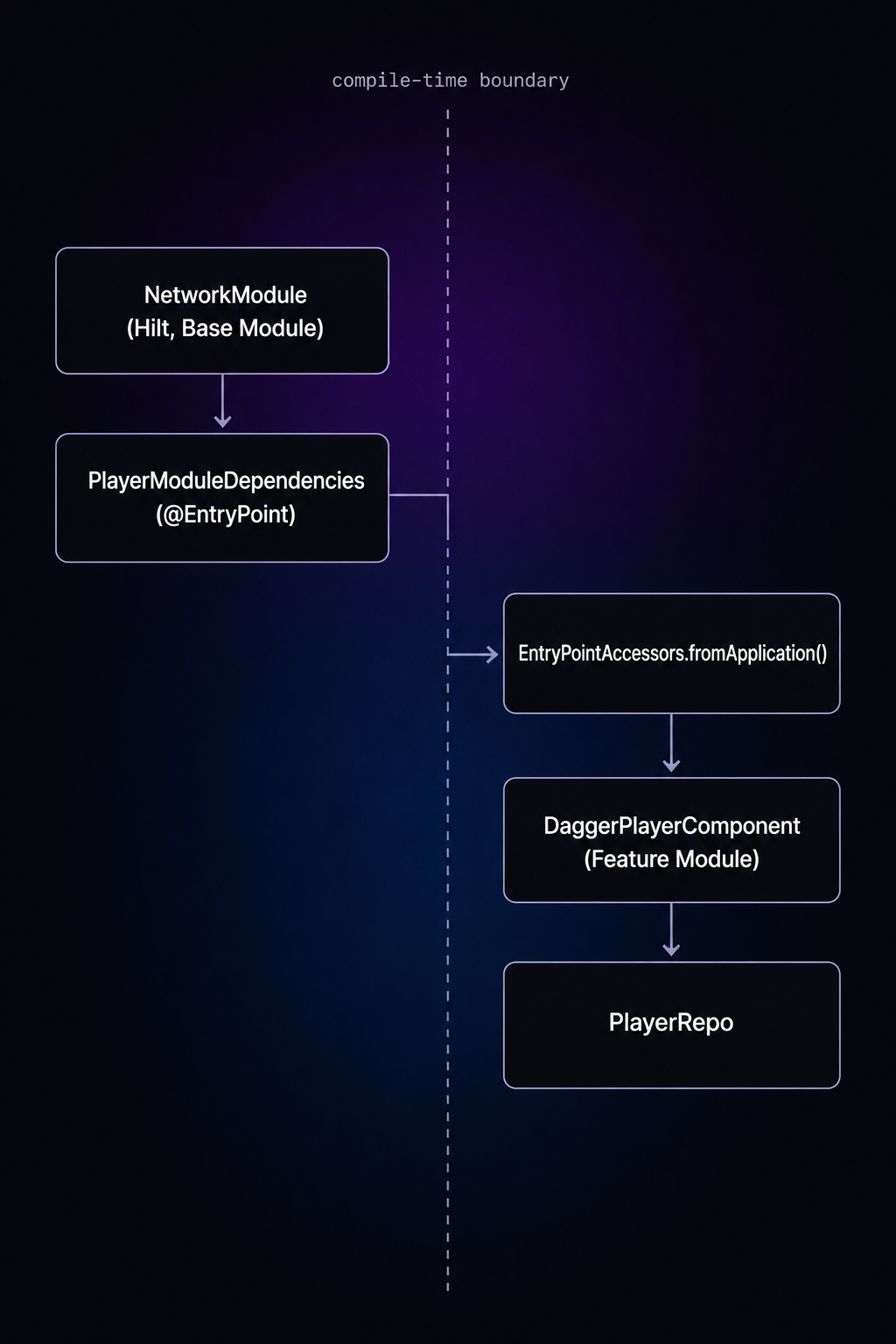
Figure 2. The Component Dependencies bridge, end to end.
One easy-to-miss detail: SplitCompat has to be installed twice, once in Application.attachBaseContext, and again in every dynamically-delivered Activity.attachBaseContext:
// app/.../CrikStatsApp.kt
override fun attachBaseContext(base: Context) {
    super.attachBaseContext(base)
    SplitCompat.install(this)
}// featureplayer/.../PlayerStatsActivity.kt
override fun attachBaseContext(newBase: Context?) {
super.attachBaseContext(newBase)
SplitCompat.installActivity(this)
}Skip the second one and the freshly-downloaded module's resources and classes won't reliably resolve at the Activity level, a bug that only shows up on-device, never in a plain ./gradlew build.
The Data and UI Flow
Once the bridge exists, the rest is standard modern Android.
HomeViewModel owns the download trigger. It checks whether the module's already installed and, if not, kicks off DynamicModuleDownloadUtil, listening for state via a small DynamicDeliveryCallback interface (onDownloading, onDownloadCompleted, onInstallSuccess, onFailed):
fun onOpenPlayerStatsClick(moduleName: String, activityName: String) {
    if (downloadUtil.isModuleDownloaded(moduleName)) {
        navigator.launchActivity(activityName)
    } else {
        pendingActivityName = activityName
        downloadUtil.downloadDynamicModule(moduleName)
    }
}
DynamicModuleDownloadUtil wraps SplitInstallManager and drives that callback off SplitInstallSessionState. DynamicFeatureNavigator launches the target Activity by class name via a bare Intent, since app can't hold a compile-time reference to a class that lives in a module it can't see.
Inside the feature module, PlayerViewModel launches a coroutine on init, asks PlayerRepo for data, and PlayerRepo uses the injected Retrofit client to hit a mocked endpoint (served through Mocky.io, configured via a BASE_URL in local.properties). Everything funnels through one sealed interface:
sealed interface UiState<out T> {
    data object Idle : UiState<Nothing>
    data object Loading : UiState<Nothing>
    data class Success<T>(val data: T) : UiState<T>
    data class Failed(val message: String) : UiState<Nothing>
}
Compose observes the resulting StateFlow and renders Loading, Success, or Failed. No other states, no ambiguity about what's currently on screen.
Proving It Works: Local Testing
Here's the part that isn't in most tutorials: building a dynamic feature module is only half the job. If you just press Run in Android Studio, it often installs everything at once, splits included, and your on-demand download path never actually gets exercised. You can ship a subtly broken SplitInstallManager call and Android Studio will never tell you.
Bundletool's --local-testing flag fixes this: it builds device-specific split APKs and flips the device into a "fake split install" mode, where SplitInstallManager genuinely fetches the feature module from local storage instead of the network, simulating the Play Store round trip without needing it. On the code side, DynamicModuleDownloadUtil switches factories based on that mode:
init {
    try {
        if (isLocalTesting) {
            splitInstallManager = FakeSplitInstallManagerFactory.create(context)
        } else {
            splitInstallManager = SplitInstallManagerFactory.create(context)
        }
    } catch (e: Exception) {
        splitInstallManager = SplitInstallManagerFactory.create(context)
    }
}
I couldn't find a clean, up-to-date walkthrough anywhere online for actually driving this loop (build, convert to split APKs, install, grant permissions, repeat), so I wrote deploy_test.sh instead of doing it by hand every time. It's a small thing, but it earns its keep:
[1/6] Detecting Devices...
[2/6] Building Debug Bundle with Gradle...
[3/6] Converting Bundle to APKs...
[4/6] Uninstalling previous version...
[5/6] Installing new APKs to device...
[6/6] Granting Permissions...
The device detection isn't decorative: if exactly one device is plugged in it grabs the serial automatically, and if there are several it lists them with model names and prompts for a number, instead of silently deploying to whichever one adb happens to pick:
if [ $count -eq 1 ]; then
    DEVICE_ID=$(echo "${device_lines[0]}" | awk '{print $1}')
else
    # list devices, read -p a selection
fi
The actual bundletool invocation adds --connected-device on top of --local-testing, which trims the generated APKs down to the ones your specific device needs instead of every ABI and density combination bundletool knows about:
java -jar $BUNDLETOOL build-apks \
  --bundle=app/build/outputs/bundle/debug/app-debug.aab \
  --output=crikstats_debug.apks \
  --local-testing \
  --connected-device \
  --device-id=$DEVICE_ID \
  --adb=$ADB_CMD
It uninstalls the previous build before installing the new one (split installs get weird about stale state otherwise) and grants storage permissions at the end so I'm not tapping through a permission dialog on every single test run. One command, and I get a device in exactly the state a real Play Store user would be in on first launch: base app installed, feature module absent, download button live.
I also wired a deep link into the feature module's manifest:
<intent-filter>
    <action android:name="android.intent.action.VIEW" />
    <category android:name="android.intent.category.DEFAULT" />
    <category android:name="android.intent.category.BROWSABLE" />
    <data android:scheme="crikstats" android:host="player" />
</intent-filter>
Mostly so I could confirm PlayerStatsActivity was reachable at all once it landed on-device, without having to route through the home screen every time.
Looking Back
The interesting part of CrikStats was never the player stats screen. It's four fields in a data class. It was everything around it: realizing that Hilt's blueprint metaphor stops working the moment the base module is compiled blind to the feature it's meant to serve, and that the fix isn't to abandon Hilt, just to hand-carry one interface across the boundary it can't cross on its own. Component Dependencies is a small pattern once you've seen it, but it's the kind of thing you only reach for after @AndroidEntryPoint fails loudly enough to make you go read how Hilt actually generates its graphs.
And the testing script was the reminder that "press Run" is a lie for anything involving on-demand delivery. If the tool you need doesn't exist, a hundred lines of bash that auto-detects your device and refuses to let stale state lie to you is worth writing.
The full source is on GitHub.
if this made you think, you might enjoy something from the library.